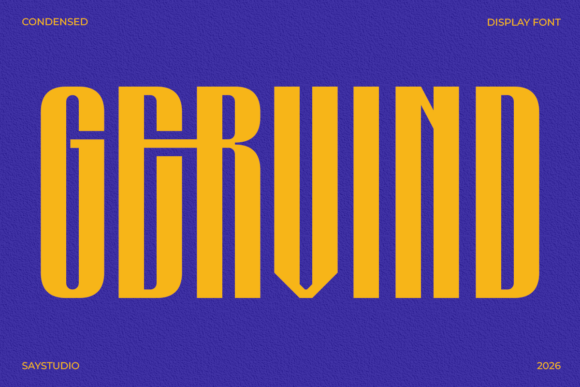
Gervind: Maximizing Impact with Bold Condensed Typography
Selecting the right display typeface is often the difference between a design that commands attention and one that fades into the background. Gervind has emerged as a significant tool for designers seeking maximum visual impact without compromising structural integrity. As a bold condensed display typeface, it is engineered specifically for modern projects where space is at a premium but clarity cannot be sacrificed. Its tall proportions and clean geometry offer a confident presence that works exceptionally well in headlines, branding systems, and digital visuals.
However, owning a powerful font like Gervind does not automatically guarantee professional results. Many creators, from freelance graphic designers to marketing teams, underestimate the technical nuances of condensed typography. Misapplying this style can lead to legibility issues, awkward spacing, or a layout that feels cramped rather than commanding. To truly leverage Gervind’s potential, it is essential to understand not just its aesthetic strengths, but also the common pitfalls associated with high-performance typography.
Understanding the Role of Condensed Geometry
Gervind is inspired by contemporary graphic trends and editorial layouts, making it ideal for commercial branding needs. Its primary function is to deliver sharp readability while maintaining a bold personality. The condensed form allows you to fit more information into striking compositions, which is invaluable for packaging, advertising, and social media content. Yet, a frequent mistake occurs when designers treat condensed fonts exactly like standard-width typefaces.
Condensed typefaces have different optical requirements. Because the letters are narrower, the negative space inside and around the characters behaves differently. A common error is applying default tracking (letter-spacing) settings that work for wider fonts but cause Gervind to look disjointed or overly tight. When letters are spaced too far apart in a condensed face, the word shape breaks down, reducing reading speed. Conversely, tightening the tracking too aggressively can cause the bold strokes to merge, creating dark spots that ruin the clean geometry.
Practical Advice: Always optically adjust tracking when using Gervind at large sizes. Do not rely solely on software defaults. Test your headline at the actual output size—what looks acceptable on a 27-inch monitor may become illegible on a mobile screen or a printed poster. The goal is consistent color and rhythm across the line of text.
Avoiding Hierarchy Conflicts in Layouts
One of the most overlooked details in using bold display fonts is establishing proper visual hierarchy. Gervind is designed to dominate, which means it naturally draws the eye. A significant misstep happens when designers use it for multiple levels of information without sufficient contrast. Using Gervind for both the main headline and subheaders creates visual noise and confuses the reader about where to look first.
This issue frequently appears in UI design and motion graphics where screen real estate is limited. If every element screams for attention, nothing actually gets noticed. The strength of Gervind lies in its ability to anchor a composition, not to fill every empty space. Overusing it dilutes its impact and can make a brand identity feel aggressive rather than confident.
- Pair with Neutrals: Balance Gervind’s strong structure with a clean, highly legible sans-serif or serif for body copy. This ensures the display font remains the focal point.
- Utilize Scale Contrast: Instead of changing fonts for subheads, try using significant size differences or weight variations within the supporting typeface family.
- Embrace Whitespace: Allow breathing room around Gervind headlines. Crowding the type against images or margins reduces its sophisticated, editorial appeal.
The Technical Advantage of PUA Encoding
Beyond aesthetics, usability is a critical factor in font selection. Many users overlook technical specifications until they encounter workflow friction. Gervind includes PUA (Private Use Area) encoding, a feature that significantly enhances accessibility for non-designers and professionals alike. Without PUA encoding, accessing special characters, ligatures, or alternates often requires specialized design software like Adobe Illustrator or InDesign.
Mistaking a standard font for a fully accessible one can lead to frustration when working in basic text editors, word processors, or web platforms. If you are a small business owner creating social media graphics in Canva, or an educator preparing presentation slides, lacking PUA access means missing out on the full character set. This limitation forces users to settle for less expressive typography or engage in time-consuming workarounds.
By utilizing Gervind’s PUA-encoded characters, you ensure that the entire character set is accessible directly through standard character maps or copy-paste functions. This streamlines workflows for content creators and marketers who need to maintain brand consistency across diverse platforms without switching between complex design tools.
Evaluating Suitability Before Commitment
Before integrating Gervind into a long-term branding system or large-scale campaign, conduct a practical stress test. It is easy to fall in love with a font’s specimen sheet, but real-world application reveals true performance. Check how the typeface handles varying lengths of text. Condensed fonts excel at short, punchy statements but can become fatiguing in longer paragraphs. Ensure your project scope aligns with the font’s intended use case.
Additionally, verify cross-platform rendering. While Gervind is built for high-performance typography, different operating systems and browsers render bold weights differently. What appears crisp on macOS might appear heavier or softer on Windows. For digital-first projects, always preview the font in the target environment to ensure the "clean geometry" translates accurately to the end user.
Finally, consider the emotional tone of your message. Gervind brings a powerful, confident presence, but confidence can sometimes read as sternness depending on context. Review your copy alongside the typography. If your message requires warmth or delicacy, you may need to soften the presentation through color, imagery, or complementary type choices. Gervind provides the structural foundation, but the overall communication strategy determines whether that structure supports or overshadows your message.
When used correctly, Gervind offers a versatile and reliable typographic solution. It empowers creative projects with a timeless visual appeal that stands out across print and digital mediums. By avoiding common spacing errors, respecting visual hierarchy, leveraging technical features like PUA encoding, and validating suitability early, you ensure that this bold condensed typeface delivers the professional impact your project deserves.