Sticky Note: Mastering the Raw Impact of a Hand-Sculpted Display Font
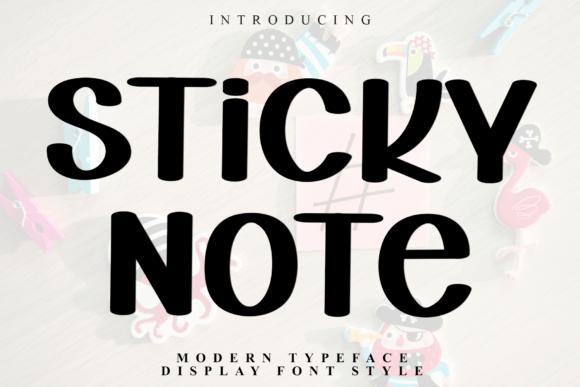
When you first encounter Sticky Note, the immediate impression is one of unapologetic weight and presence. This is not a typeface designed to whisper in the background; it is a massive, high-impact display font that captures a raw, hand-sculpted personality. For designers, marketers, and creators looking to inject authenticity into their visual identity, this typeface offers a unique blend of modern stability and organic imperfection. However, its distinctive heavy blocky letterforms and thick silhouettes demand respect and careful application. Treating Sticky Note like a standard sans-serif or using it without considering its artisanal nuances is a common pitfall that can turn a bold design choice into an unreadable mess.
Understanding the specific anatomy of this font is the first step toward using it effectively. Labeled as a modern typeface display font style, Sticky Note features a stable vertical axis that grounds its otherwise playful proportions. The slightly tapered terminals provide a customized feel, distinguishing it from digitally perfect geometric fonts. This balance between structure and hand-drawn character is exactly why it excels in editorial titles, creative logo design, contemporary apparel, and social media headers. Yet, this same character is what requires you to adjust your typical typographic workflow to avoid compromising legibility and aesthetic quality.
The Trap of Default Spacing and Sizing
One of the most frequent mistakes beginners and even seasoned professionals make with Sticky Note is relying on default software settings. Because this font possesses such heavy silhouettes, the negative space between characters is just as important as the ink itself. When used at smaller sizes or with standard tracking, the thick letterforms can visually merge, creating dark blobs that destroy readability. This is particularly problematic in digital environments where screen resolution can further compress these details.
To correct this, you must actively manage optical spacing. Do not assume the font’s built-in kerning pairs will suffice for every layout, especially when scaling up for high-performance social media headers or large-format printing. You should manually adjust tracking to allow the organic character proportions to breathe. A practical approach is to increase letter-spacing slightly more than you would for a thinner typeface. Test your designs at the actual viewing size rather than zoomed in on a canvas. If the individual shapes lose their distinct tapered terminals and begin to look like a solid wall of texture, you have gone too small or too tight. Sticky Note thrives on generosity of space; restricting it undermines its hand-sculpted personality.
Misunderstanding Hierarchy and Pairing
Sticky Note is inherently loud. A common error occurs when designers attempt to use it for subheadings, captions, or body text, or when they pair it with other display fonts that compete for attention. This creates visual vibration and confusion, diluting the impact you are trying to achieve. The font’s strength lies in its role as a primary focal point. Using it for secondary information wastes its potential and frustrates the reader who is trying to scan content quickly.
Instead, treat Sticky Note as the anchor of your hierarchy. Pair it with clean, neutral typefaces that provide contrast without competition. A simple geometric sans-serif or a highly legible serif works best to support the raw energy of the display font. For example, in a contemporary apparel campaign, let Sticky Note handle the main slogan or brand name, while using a lighter weight companion font for product details and sizing information. This ensures the artisanal feel remains impactful and grounded rather than chaotic. Always ask yourself if the supporting typeface recedes appropriately; if both fonts are shouting, neither is being heard.
Evaluating Technical Suitability Before Committing
Before downloading or purchasing Sticky Note for a commercial project, you need to verify its technical alignment with your medium. The hand-sculpted nature means that rendering can vary significantly between print and screen. What looks beautifully textured on a high-resolution monitor might appear jagged or aliased on mobile devices or low-DPI displays. Additionally, because the letterforms are blocky and dense, ink spread on uncoated paper can fill in the delicate tapered terminals, altering the intended personality.
- Check OpenType Features: Ensure the version you acquire includes necessary ligatures or alternates. These features are often essential for maintaining the organic flow in logo design and preventing awkward collisions in all-caps settings.
- Test Cross-Platform Rendering: Preview the font on multiple devices and browsers. High-impact editorial titles must remain crisp whether viewed on a retina display or a standard office monitor.
- Verify Licensing Scope: Display fonts are often licensed differently for web, app, and desktop use. Confirm that your license covers high-performance social media headers and merchandise if that is your intent, as these categories sometimes require specific commercial tiers.
- Assess Language Support: If your project targets international audiences, verify that the character set supports required diacritics. The hand-sculpted style may not extend seamlessly to all glyphs, which could force an inconsistent fallback font.
Avoiding Stylistic Overkill in Branding
There is a temptation to lean entirely into the "raw" aesthetic by combining Sticky Note with grunge textures, distressed overlays, or chaotic layouts. While this might seem thematically appropriate, it often results in a design that feels dated or amateurish. The font already carries significant textural weight through its form alone. Adding external noise competes with the intrinsic craftsmanship of the typeface and reduces professional polish.
A better approach is to let the typography stand on a clean foundation. Use flat colors, ample whitespace, and sharp photography to frame the font. The contrast between a pristine layout and the organic irregularity of Sticky Note creates a sophisticated tension that elevates the work. In logo design, resist the urge to manually distort the letters further; the designer has already balanced the tapered terminals and vertical axis for optimal recognition. Your job is to present that balance, not to disrupt it. Trust the font’s inherent personality to deliver the message without excessive decoration.
Making Informed Decisions for Long-Term Value
Choosing Sticky Note should be a strategic decision based on long-term usability, not just current trends. Ask whether the font’s massive scale aligns with your brand’s voice across all touchpoints. If your communication strategy relies heavily on dense information delivery or subtle nuance, this display font may create friction despite its visual appeal. It is ideal for capturing attention and conveying confidence, but it requires a supportive ecosystem of complementary assets to function effectively.
Take time to prototype real-world applications before finalizing your choice. Create mockups of social media posts, business cards, and website hero sections. Evaluate how the font performs when animated or resized responsively. Does the hand-sculpted personality translate when reduced to a favicon or app icon? If the answer is no, consider reserving Sticky Note for specific campaigns rather than adopting it as a universal system font. By approaching selection with critical evaluation rather than impulse, you ensure that this powerful typographic tool enhances your work’s clarity and impact rather than detracting from it. Ultimately, successful use of Sticky Note comes down to restraint, technical diligence, and a deep appreciation for the space between the letters.