Symphoney: Using This Dancing Handwritten Font Without Compromising Readability
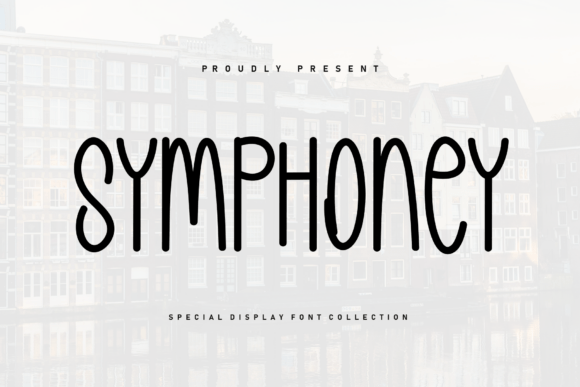
There is an immediate warmth to Symphoney that few digital typefaces manage to capture. As a sweet and beautiful handwritten font, it features characters that dance along the baseline rather than sitting in a rigid, mechanical row. This organic movement is exactly why designers, bloggers, and small business owners are drawn to it for projects requiring a personal touch. However, the very characteristic that makes Symphoney charming—its playful vertical rhythm—is also what causes the most usability issues when applied without restraint. Understanding how to harness this energy without sacrificing legibility is the difference between a design that feels authentic and one that looks amateurish.
The Baseline Dance: Feature or Flaw?
The defining trait of Symphoney is its bouncing baseline. Unlike standard script fonts where letters align perfectly at the bottom, these glyphs move up and down to mimic natural penmanship. For invitations, greeting cards, or short social media quotes, this creates a cozy accent that feels human and approachable. The mistake many beginners make is treating this decorative feature as a utility. When you set long paragraphs or dense blocks of text in Symphoney, the dancing effect becomes visual noise. The reader’s eye has to work harder to track the line, leading to fatigue and disengagement.
To avoid this, reserve Symphoney strictly for display purposes. It excels in headlines, logos, pull quotes, and short captions. If you find yourself needing more than three lines of text, it is time to switch to a complementary sans-serif or serif typeface. Let Symphoney be the melody, not the entire symphony. Pairing it with a clean, neutral body font like Montserrat, Lato, or Open Sans provides the necessary contrast that allows the handwritten elements to shine without overwhelming the viewer.
Common Mistakes in Spacing and Hierarchy
Handwritten fonts often come with unique metrics that differ from standard system fonts. A frequent oversight is assuming default tracking (letter-spacing) and leading (line-height) settings will work out of the box. Because Symphoney’s characters have varying heights and depths, tight tracking can cause ascenders and descenders to collide, creating muddy clusters of ink. Conversely, excessive tracking can break the cursive connections or the visual flow that gives the font its cohesive personality.
- Check Optical Kerning: Always manually adjust spacing for logos or large headers. Automated kerning tables in handwritten fonts are rarely perfect for every letter combination.
- Increase Line Height: Due to the bouncing baseline, standard 1.2 or 1.4 line height is often insufficient. Test 1.6 to 2.0 to ensure the "dancing" letters do not crash into the line above or below.
- Avoid All-Caps: Symphoney is designed with lowercase forms in mind. Forcing uppercase usually results in awkward shapes and destroys the intended casual aesthetic. If you need emphasis, use size or color instead of capitalization.
Evaluating Legibility Across Different Media
A font that looks stunning on a high-resolution desktop monitor may fail completely on a mobile screen or when printed at a small scale. Before committing Symphoney to a project, you must test it in the actual environment where it will be consumed. The intricate details and swashes that look beautiful at 72pt can disappear or blur at 12pt. This is particularly critical for entrepreneurs creating product packaging or educators designing worksheets. If the audience has to squint or guess at letters, the cozy vibe is instantly replaced by frustration.
For web use, ensure you are serving the correct file format and weight. Handwritten fonts can sometimes have larger file sizes due to complex glyph outlines. Optimize your web fonts to prevent slow loading times, which negatively impacts both user experience and SEO. On print projects, request a physical proof before running a full batch. Ink spread on uncoated paper can thicken the delicate strokes of Symphoney, potentially closing up counters (the open spaces inside letters like 'a' or 'e'). Adjusting the stroke weight or choosing a slightly larger point size during the design phase can preemptively solve these production issues.
Licensing and Commercial Viability
Beyond aesthetics, one of the most significant areas where creators stumble is licensing. Symphoney is available through various marketplaces, and terms can vary significantly between personal and commercial licenses. A common misunderstanding is assuming that purchasing the font grants unlimited rights. Many standard licenses cover personal use only, or limit commercial impressions, end products, or client work. Using Symphoney in a logo for a client, on merchandise for sale, or in a monetized YouTube video often requires an upgraded license.
Neglecting this step does not just pose a legal risk; it can damage professional reputation. Clients expect designers to handle usage rights correctly. Always read the End User License Agreement (EULA) before downloading. If you are a freelancer, factor the cost of the appropriate commercial license into your project quote. It is far more efficient to secure the right license upfront than to retrofit a design later because the original usage terms were violated. Additionally, verify if the license includes webfont files (@font-face) if you plan to use Symphoney on a website, as desktop licenses rarely cover web embedding.
Making the Right Choice for Your Brand
While Symphoney is undeniably attractive, it is not a universal solution. It works best for brands and projects that want to convey softness, nostalgia, creativity, or intimacy. It is less suitable for corporate finance, medical technology, or luxury minimalism, where precision and stability are paramount. Before applying this typeface, ask whether its personality aligns with the message you are trying to communicate. A mismatch between tone and typography creates cognitive dissonance for the audience, even if they cannot articulate why something feels "off."
When comparing Symphoney to other handwritten options, look specifically at the x-height and character width. Some scripts are tall and narrow, while others are wide and round. Symphoney sits in a balanced middle ground that offers good versatility, but you should still test it alongside your existing brand assets. Create mockups using real content, not placeholder text. Seeing the font in context with your specific copy reveals issues that specimen sheets hide. Does it maintain its charm when used repeatedly? Does it pair well with your photography style? These practical evaluations ensure that your investment in Symphoney yields a design that is both beautiful and functionally sound.
Ultimately, successful typography is about serving the reader. Symphoney offers a wonderful opportunity to add a cozy, human accent to your work, provided you respect its limitations. By avoiding dense text blocks, adjusting spacing intentionally, verifying legibility across formats, and securing proper licensing, you transform this sweet handwritten font from a mere decoration into a powerful communication tool. Use it with intention, and it will bring a genuine sense of warmth to your creative projects for years to come.