Rasteron: Mastering Retro Pixel Typography Without the Common Pitfalls
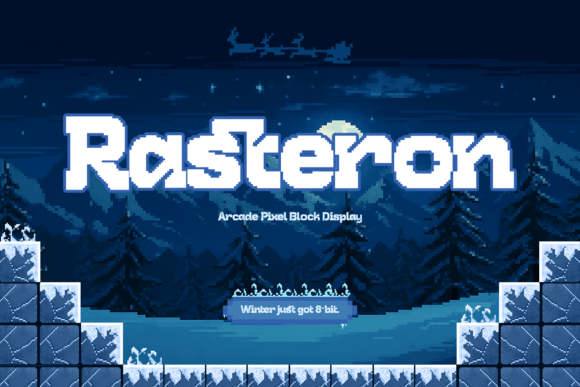
Rasteron is a retro-inspired arcade pixel display font designed to bring the nostalgic charm of 8-bit gaming into modern creative projects. Built on a precise pixel grid, each letter is structured, bold, and blocky, delivering crisp readability with authentic vintage character. For designers, marketers, and content creators, this typeface offers an immediate visual shortcut to the golden era of console games and digital aesthetics. However, the very features that make Rasteron appealing—its rigid geometry and distinct stylistic flair—are also what can lead to significant design missteps if applied without intention.
Choosing a pixel font is rarely as simple as selecting a style you like and applying it to a headline. The difference between a professional, evocative design and an amateurish layout often lies in technical execution and contextual awareness. Understanding how to leverage Rasteron effectively requires moving beyond surface-level nostalgia and addressing the practical realities of digital typography.
The Readability Trap in Display Typography
The most frequent mistake when working with Rasteron is treating it as a versatile workhorse rather than a specialized display tool. Because the letterforms are bold and chunky, there is a temptation to use them for subheadings, captions, or body copy to maintain a consistent retro theme throughout a project. This approach almost always backfires. Pixel fonts rely on negative space within a strict grid to create legibility. When scaled down or used in long-form text, those internal spaces collapse, turning words into indistinguishable blocks of color.
To avoid this, restrict Rasteron strictly to headlines, logos, short call-to-action buttons, and large-format posters. Pair it with a clean, modern sans-serif or a highly legible monospaced font for supporting text. This contrast not only preserves readability but actually enhances the impact of the pixel aesthetic by giving the eye a place to rest. A common oversight is failing to test the font at the exact size it will be viewed on screen; what looks crisp in a design file at 400% zoom may become muddy at actual pixel dimensions on a mobile device.
Ignoring Grid Alignment and Scaling Rules
Pixel art and pixel typography adhere to mathematical rules that standard vector fonts do not. A critical error occurs when designers scale Rasteron to arbitrary percentages or non-integer values. Unlike smooth vector typefaces, pixel fonts must snap to a physical pixel grid to render correctly. Scaling to 95% or 150.5% introduces anti-aliasing artifacts, resulting in blurry edges and gray pixels that destroy the sharp, retro illusion.
Always scale Rasteron in whole number increments (100%, 200%, 300%) relative to its native resolution. If you are designing for web, ensure your CSS uses integer-based sizing or specific pixel-perfect units. In print workflows, verify that the output resolution aligns with the font’s grid structure. Overlooking this technical detail is the primary reason pixel fonts look unprofessional in final deliverables, regardless of how good they appeared during the drafting phase.
Contextual Misalignment and Seasonal Assumptions
Rasteron captures the spirit of classic console games, winter levels, and festive arcade screens. While this makes it exceptional for holiday campaigns and seasonal branding, a common misunderstanding is assuming the font is only suitable for Christmas or winter themes. Conversely, some users apply it to serious corporate communications where the playful energy clashes with the message tone.
Evaluate the emotional weight of your project before committing to this typeface. Rasteron conveys fun, nostalgia, energy, and playfulness. It does not convey luxury, solemnity, or high-tech futurism. Using it for a law firm’s annual report or a minimalist skincare brand will likely create cognitive dissonance for the audience. However, for tech startups, indie game launches, retro-themed events, or educational materials aimed at younger demographics, it serves as a powerful engagement hook. Always ask whether the font supports the communication goal or merely satisfies a personal aesthetic preference.
Licensing and Commercial Usage Oversights
When downloading or purchasing Rasteron, many creators skim over licensing terms, assuming all retro-style fonts carry similar usage rights. This can lead to costly legal issues or forced redesigns later. Some versions may be free for personal use but require a commercial license for client work, merchandise, or embedded web use. Others may have restrictions on modifying the glyphs or using the font in logo trademarks.
- Verify the license tier: Ensure your purchase covers the intended medium (print, web, app, video).
- Check modification rights: If you plan to alter characters to fit a specific brand identity, confirm this is permitted.
- Confirm trademark eligibility: Not all font licenses allow the typeface to be part of a registered logo.
- Document your purchase: Keep receipts and license files accessible for future audits or client handoffs.
Treating licensing as an afterthought undermines the professionalism of any creative project. Budget for the correct license upfront to avoid disruptions.
Technical Integration and File Format Selection
Another area where efficiency suffers is in file format selection. Rasteron may be available in multiple formats including OTF, TTF, WOFF2, and sometimes even bitmap-specific formats. Using the wrong format for your platform degrades quality and performance. For web projects, WOFF2 is typically optimal for load speed and rendering. For print and general design software, OTF or TTF is standard. Using a web-optimized format in Adobe Illustrator may limit OpenType features, while using a heavy desktop format on a website slows page load times and hurts SEO.
Additionally, consider accessibility. Pixel fonts inherently pose challenges for screen readers and users with visual impairments. Never use Rasteron for essential navigational elements or critical information without providing alternative text or ensuring sufficient contrast ratios. The chunky shapes add playful energy, but they should never compromise inclusive design standards. Testing with accessibility tools during the design phase prevents exclusionary outcomes.
Balancing Nostalgia with Modern Standards
Finally, resist the urge to surround Rasteron with other dated design elements simply because the font feels retro. A common pitfall is creating a pastiche of 8-bit clichés—neon colors, scan lines, glitch effects—that overwhelms the viewer and dates the work instantly. Rasteron already carries significant historical weight; it doesn’t need additional costume jewelry.
Instead, juxtapose the font with contemporary layouts, ample whitespace, and modern color palettes. This tension between old and new creates sophistication and keeps the design feeling fresh rather than derivative. Let Rasteron be the accent, not the entire composition. By respecting both the font’s heritage and current design best practices, you transform every headline into a pixel-powered statement that resonates across generations without sacrificing usability or professional credibility.